

See what people did while they were there
Not how many came, but who read what and asked what. This is the record you use to decide who to contact next.
A visit count does not tell you what to do
You can find out how many people came this week. You still do not know what to do about it.
What you need is people, not totals. Someone who opened the pricing page three times and read a case study to the end deserves different treatment from someone who left after ten seconds.
Saleslink groups visits by person. Which material they read, what they asked the chatbot, how many times they came back across days — all on one line. Leave a contact and a name attaches to that record.
What each visitor leaves behind
What they read
Which materials and pages they opened, and where the time actually went.
What they wondered about
Every question put to the chatbot, showing interests the material alone would hide.
Where they came from
Search, a link you sent, or a scanned business card — each is distinguished.
How often they returned
Visitors who came back across several days are flagged. Interest that has not cooled.
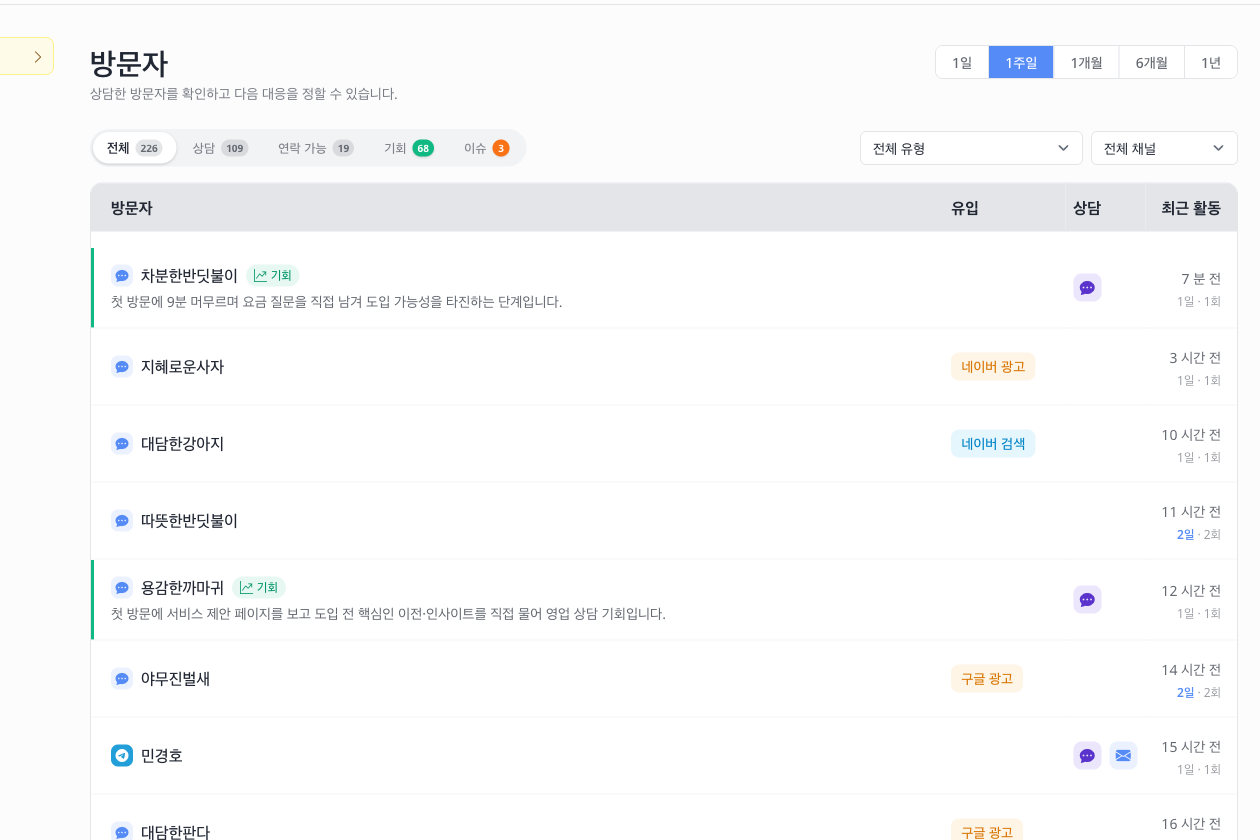
It sorts out who to look at first
Once visitors pile up you cannot read the list from the top. So two groups are surfaced, based on what was said.
One is visitors worth approaching — weighing a decision, asking about terms. The other is visitors where delay costs you — hitting a problem, or frustrated at not getting an answer.
This grouping comes from AI reading the conversation, so it can miss the real intent. That is why you can change it with a click, cycling between opportunity, issue, and neither. What a person sets wins.
Working with the record
Give them a name
Add a label you recognise, so people are distinguishable before any contact is left.
Leave a note
Write down what was said on a call or what to do next. It is there when you open them again.
Reread the conversation
Go through the exchange from the start to find where it stalled.
Reach out directly
Where contact details were left, call or email straight from the screen.
Contacts stay inside your team
Names and numbers a visitor leaves are visible only to the team running that material. If the same person visits another company here, nothing crosses between them.
Common questions
- Visitors never log in — how are they told apart?
- By browser characteristics, with no login required. Switching device or browser can split one person in two, so a contact detail is what makes it certain.
- Do we see where they connected from?
- Down to the city. The connecting address itself is not stored.
- The grouping keeps getting it wrong.
- It comes from AI reading the conversation, so it can differ from your judgement. Change it on screen and your choice sticks.
- Is there a limit on how many visitors we can examine?
- The plan sets how much detailed analysis you can open. You are warned as you approach it.
Decide who to call first
Look at people instead of totals and the next step picks itself.