

A card that keeps working after you hand it over
Contact details open alongside your material and an AI conversation, so whoever receives it can ask right there.
Most cards end up in a drawer
You handed over a name and a number, but they still do not quite know what your company does. The explanation lasted a few sentences.
When they do become curious, there is no easy way to ask. Calling feels like a lot, and digging through a website for the right page is a chore.
A digital business card puts your material and a conversation next to the contact details. Attach a material link or a website chatbot and the recipient can open it whenever, and ask on the spot.
How it comes together
-
1
Fill in the basics
Name, title, direct and main numbers. The logo comes from the brand logo on your account.
-
2
Choose what opens with it
Pick the website chatbots and material links to attach, and set their order — an introduction, a product catalogue, and your site side by side.
-
3
Set the look
Choose a design template, and write anything extra you want the card to say.
-
4
Hand it over
Send the address by messenger or email, or use the QR code in person. The tail of the address is yours to name.
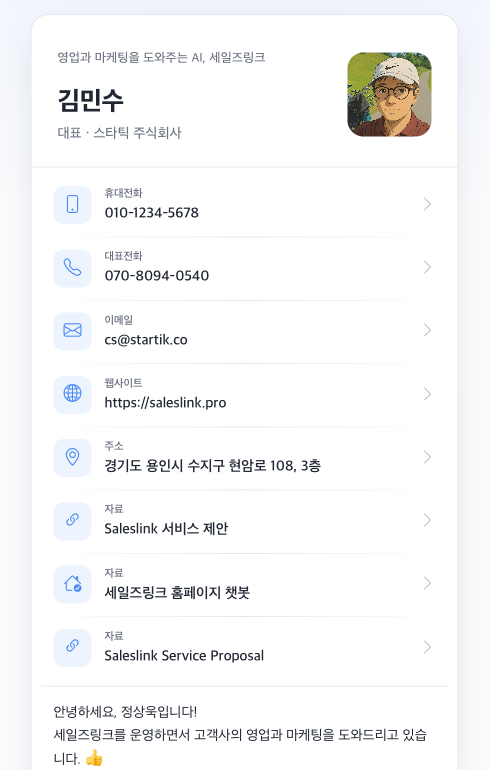
What the recipient does
Saves the contact
Straight into their phone book — nothing to type out.
Opens the material
The introduction and catalogue you attached, readable on the spot.
Asks what they wondered
Questions too small for a phone call go to the AI, answered from your material.
Passes it on
One address forwards intact to whoever decides internally. Nothing to lose in a wallet.
You see who opened it
Visits through the card are recorded like any other. What they read and what they asked is there, so you know what to open with next time.
Common questions
- Does the recipient need an app?
- No. The address opens in a browser.
- Can each person on the team have their own?
- Yes, each with different material attached. Shared things like the logo are set once on the account.
- Can we change a card we already handed out?
- Swap the attached material and the address stays the same, so nothing needs resending. Changing the address itself does break cards already given.
- Can we hide it for a while?
- Take the card private and it stops opening.
Try it at your next meeting
Leave behind material and a conversation, not just a name.